
Forgot your photo vault password? What you can and can’t do
Quick answer
Start with the recovery option you set up in the app: a recovery email, security question, linked account or recovery phrase, usually behind a “Forgot” link. If the vault encrypts your photos properly and you set up none of those, nobody can reset it for you, not even the app’s maker. Then your best chance is another copy: Recently Deleted, your cloud photo library or an older backup.
A vault you can always get back into, for free
Hideroom is coming to iPhone. One email when it launches, then we delete your address.
On this page
Forgot photo vault password, PIN or pattern? The first thing to know is that the answer depends on how the app was built, not on how hard you try. Some vaults can be reset with an email or an account. Some can’t be reset by anyone, by design. This guide explains how photo vault recovery usually works, what to try in what order, where your photos might still exist outside the vault, and why the strongest vaults have no back door.
Forgot photo vault password? First, don’t make it worse
Careful
Before you try anything, three things to avoid:
- Don’t uninstall the app. Deleting an app usually deletes the files it kept on the phone. Google says this plainly about its own Locked Folder: items you haven’t backed up are lost if you uninstall Google Photos or clear its data.
- Don’t guess wildly. Some vault apps add waiting times or other penalties after repeated wrong tries. Read the app’s help page before you burn through attempts.
- Don’t pay a stranger. Websites and “recovery tools” that promise to crack any vault are, at best, guessing for you and, at worst, after your money or your photos. If a vault is properly encrypted, a tool can’t do what the maker can’t.
How photo vault recovery usually works
Vault apps tend to use one of these approaches, or a mix. Which one yours uses decides what you can do now.
| Recovery method | How it works | What you need now |
|---|---|---|
| Recovery email | The app emails a reset link or code to an address you gave it | Access to that email account |
| Security question | You answered a question at setup | The exact answer you gave |
| Linked account | The vault is tied to an account, such as a Samsung account for Secure Folder | That account’s password |
| Phone lock | The vault opens with your phone’s own passcode or screen lock | Your phone passcode |
| Recovery phrase or key | You wrote down a phrase or key at setup | The phrase, exactly as written |
| None | No recovery was set up, or the app doesn’t offer one | Nothing can open it; look for other copies |
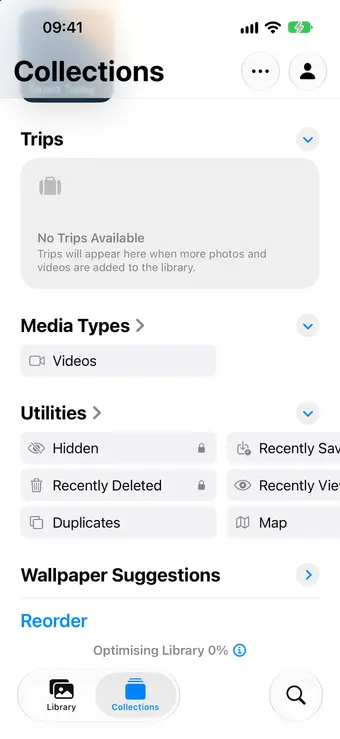
A few built-in examples make this concrete. Apple’s Hidden album opens with Face ID, Touch ID or your iPhone passcode, so it’s as recoverable as your phone. Google Photos’ Locked Folder always uses your phone’s screen lock; you can’t give it a separate password. Samsung’s Secure Folder has its own lock, and if you turned on Reset with Samsung account at setup, tapping Forgot and signing in to your Samsung account lets you choose a new one. Samsung says that without that option, you won’t be able to get back in.
Steps to recover photos from a photo vault
Work through these in order and stop when one works.
- Look for a Forgot link on the vault’s lock screen. It’s often small, sometimes behind a long press or a settings icon on the lock screen itself.
- Search your email for the vault’s name. A welcome or setup email can tell you which address and recovery method you used.
- Find the maker’s own help page through the app store listing or the developer’s official website, and contact support from there. Describe what you set up, not your passcode.
- If the vault uses your phone’s passcode and you’ve forgotten that too, you’re into phone recovery. On iPhone, Apple’s route back in is to reset the phone with a computer, which erases what’s on it, so you’ll need a backup to get anything back.
- Look for other copies of the photos. Deleted items stay in Recently Deleted on iPhone, and in the trash in Google Photos and Samsung Gallery, for 30 days. Check your iCloud Photos or Google Photos library, an old phone, and any computer backups. Our guide on whether hidden photos transfer to a new iPhone explains which copies move with you and which don’t.
Want to know the day Hideroom is ready?
Hideroom is coming to iPhone. One email when it launches, then we delete your address.
Why nobody can reset a properly encrypted vault
This part is frustrating, but it’s also the reason a good vault is worth having.
When a vault really encrypts your photos, the key that unlocks them comes from something only you have: your passcode, a phrase you wrote down, or a secret stored in your phone’s security chip. The app’s maker never sees that key. That’s what stops a thief, a snoop, or anyone with a copy of your backup from opening it.
The same design means that if you lose every way in, there’s nothing left for anyone to reset with. If a company can reset your vault without any recovery method you set up yourself, it means the company can get at your key somehow, which also means your photos are only as private as that company’s systems. Neither choice is wrong, but you should know which one you’ve made.
How Hideroom handles a forgotten pattern
Where Hideroom fits
Hideroom is coming to iPhone soon, with Android next. It treats forgetting as something that will happen to someone eventually and plans for it up front.
Each room opens with a drawn pattern, and each room has its own nine-word recovery phrase. The phrase is always made by the app, never chosen by you, because phrases people invent tend to be song lyrics or famous lines, which are the first things an attacker tries.
- Forgot the pattern: tap Use recovery phrase on the lock screen, type the nine words and the room opens. Then draw a new pattern. It’s free.
- Forgot the phrase but know the pattern: open the room and make a new recovery phrase in its settings. Also free.
- Forgot both: the room can’t be opened, by anyone, including us. There’s no server, no master key and no reset to sell, and the app says so before it matters.
To stop the last case sneaking up on you, Check my backup asks for the whole phrase and uses it to open a few photos straight from your backup in your own iCloud. The app suggests doing that after your first backup and then every 90 days, so you find out a phrase is lost while you can still make a new one. The security page has the full detail, including what the phrase protects and how strong it is.
Set yourself up so this doesn’t happen again
Whatever vault you use, the fix is the same. Write the recovery details on paper the day you set it up and keep that paper somewhere safe and away from the phone. Test it once, while you still remember the passcode. And keep a second copy of anything you can’t replace, because a vault is often the only copy left. If you’re on Android, our guide on how to hide photos on Android covers which built-in options back up and which don’t.
Questions
Can the app’s maker reset my photo vault password?
Only if the app was built to allow it, usually through a recovery email or an account you signed in with. If the vault encrypts photos with a key that comes from your passcode and you set up no recovery method, the maker has nothing to reset with. That’s the point of the encryption.
Can I recover photos from a photo vault without the password?
Not from inside a properly encrypted vault. You can often find the same photos elsewhere, though, in Recently Deleted or the trash (iPhone, Google Photos and Samsung Gallery all keep deleted items for 30 days), in your iCloud or Google Photos library, or in an older phone or computer backup.
Will reinstalling the vault app reset the password?
Usually not in a helpful way. Deleting an app normally deletes the files it kept on the phone, so you’d lose the photos rather than the password. Don’t uninstall until you’ve read the app’s own help page and know whether its files are backed up somewhere you can restore from.
What happens if I forget my Hideroom pattern?
Tap Use recovery phrase on the lock screen, type the nine words you wrote down, and the room opens so you can draw a new pattern. It’s free. If you lose both the pattern and the phrase, that room can’t be opened by anyone, including us.
Written by Zaniar with AI research help, and checked against the sources below on 23 October 2026.How we write guides
Related guides
Backups and moving phones · 5 min read
Do hidden photos transfer to a new iPhone?
Yes, hidden photos move with your library. How it works with iCloud Photos, Quick Start, iCloud backup or a computer, and what to check first.

Hiding photos · 5 min read
How to hide photos on Samsung and Android
Hide photos on a Samsung Galaxy or any Android phone with Secure Folder, Gallery's Private album or Google Photos Locked Folder, plus the backup catches.

Hiding photos · 5 min read
How to find hidden photos on iPhone
Find the Hidden album on iPhone in four taps, plus what to do if it's missing, won't open, or you meant the hidden apps folder. iPad and Mac too.


Sources
- Use a computer to reset your iPhone and your passcode, Apple Support, checked 23 October 2026
- Delete photos on your iPhone or iPad, Apple Support, checked 23 October 2026
- Hide photos on your iPhone, iPad, Mac or Apple Vision Pro with the Hidden album, Apple Support, checked 23 October 2026
- Hide sensitive photos & videos in Locked Folders (Android), Google Photos Help, checked 23 October 2026
- Delete photos & videos (Android), Google Photos Help, checked 23 October 2026
- Use the Secure Folder on your Galaxy phone or tablet, Samsung US, checked 23 October 2026
- What is the Secure Folder and how do I use it?, Samsung UK, checked 23 October 2026
- Pictures will not display in the Gallery app, Samsung US, checked 23 October 2026
Spotted something out of date? Email support@hideroom.app.