
Is it safe to keep a photo of your passport on your phone?
Quick answer
Yes, if you keep it somewhere private. US and UK government travel advice both say a copy of your passport helps if the real one is lost or stolen, though a copy never replaces it. The risk is where the photo lands: the camera roll syncs to the cloud and opens with your phone’s passcode, so keep it out of the camera roll and in an encrypted, locked place.
Keep your passport photo in a private room
Hideroom is coming to iPhone. One email when it launches, then we delete your address.
On this page
Keeping a photo of your passport on your phone is sensible, and governments recommend it. The question isn’t whether to have a digital copy of your passport, it’s where to store it. A passport photo sitting in your camera roll is handy for you and handy for anyone else who gets into your phone or your cloud account. If you’ve searched “store passport on iPhone”, this guide covers why a copy is worth having, what it can’t do, the real risks, and how to keep the copy useful to you and nobody else.
Why a digital copy of your passport is worth having
Both the US and UK governments point travellers towards keeping a copy.
The US State Department’s traveller’s checklist says to make copies of your travel documents, because they help you replace the originals if they’re lost or stolen. It suggests giving one set to someone you trust, keeping another set with you but apart from the originals, and taking photos of your documents with your phone. If you do lose a US passport abroad, the State Department’s list of what to bring to the embassy includes proof of citizenship, such as a birth certificate or a photocopy of your missing passport.
GOV.UK’s foreign travel checklist tells you to have a backup plan for key information, including your passport details, in case you lose your phone, either shared with family or friends or kept on a secure storage service. And when you cancel a lost or stolen UK passport, GOV.UK says a photocopy or photo of it helps you answer the questions about it. If you’re abroad and need to travel urgently, you may be able to apply for an emergency travel document, which carries a fee.
So the copy has a real job: it speeds up reporting and replacing a lost passport. It’s worth having one of the photo page at least, plus any visa pages you’re travelling on.
What a passport photo on your phone can’t do
A photo is a record, not a document. You can’t travel on it, and no border will accept it in place of the passport.
Apple Wallet’s Digital ID is a separate thing and worth knowing about if you’re American. You create it from an unexpired US passport by scanning the photo page, reading the passport’s chip with your iPhone and taking a selfie. It needs an iPhone 11 or later on the latest compatible iOS, with the phone’s region set to the United States. You can present it at TSA checkpoints for domestic flights and at some businesses and apps. Apple is clear that it isn’t a passport or a replacement for one, and that it can’t be used for international travel or border crossing. It isn’t available for UK passports.
The real risks of a passport photo in your camera roll
Careful
The danger isn’t the photo. It’s where a camera roll photo goes without you thinking about it.
It syncs to the cloud. With iCloud Photos on, Apple keeps every photo you take in iCloud. Under Apple’s standard data protection, iCloud Photos is encrypted on Apple’s servers with keys Apple holds. Advanced Data Protection makes it end-to-end encrypted, but Apple can no longer offer that to new users in the UK. Anyone who gets into your Apple Account, through a reused password or a phishing message, can see your passport in your photo library.
It can end up shared. If you use iCloud Shared Photo Library with sharing from the Camera turned on, new photos can go straight into the shared library, where every participant can see, edit and delete them. A passport snapped at the airport can land in front of your whole family, or a former partner.
It opens with your passcode. Anyone who knows your phone’s passcode can scroll your library. The Hidden album helps keep it out of sight, but Apple’s Hidden album opens with Face ID, Touch ID or that same passcode.
Apps you’ve given photo access can see it. If you’ve let an app see your whole library, it can see your passport too. Malware found in official app stores has read photo galleries looking for valuable text; our guide on whether it’s safe to photograph a seed phrase covers one example.
It’s a gift to identity fraud. A clear photo of your passport’s data page shows your full name, date of birth, nationality, passport number and face. That’s why both governments tell you to report a lost passport quickly, to protect yourself from identity theft. The same logic applies to a copy of it sitting somewhere careless.
Want to know the day Hideroom is ready?
Hideroom is coming to iPhone. One email when it launches, then we delete your address.
Store passport on iPhone: a safer routine
A safer routine takes about five minutes.
- Take the photo somewhere private. If you use a vault app with its own camera, take it there so it never touches the camera roll. Otherwise, take it, move it, then delete the original.
- Capture the right pages. The photo page at minimum, plus any visa or residence pages you’re relying on for the trip.
- Check the copy is readable. Zoom in and make sure the passport number and machine-readable lines at the bottom are sharp.
- Delete the camera roll original properly. Deleted photos sit in Recently Deleted for 30 days, so empty it from there too. With iCloud Photos on, the deletion applies on all your devices.
- Keep a second copy off the phone. A printed copy in a different bag, or one shared with someone you trust at home, means losing your phone and passport together isn’t a disaster.
- Replace it when the passport changes. A copy of a cancelled or expired passport still carries your personal details, so delete old ones.
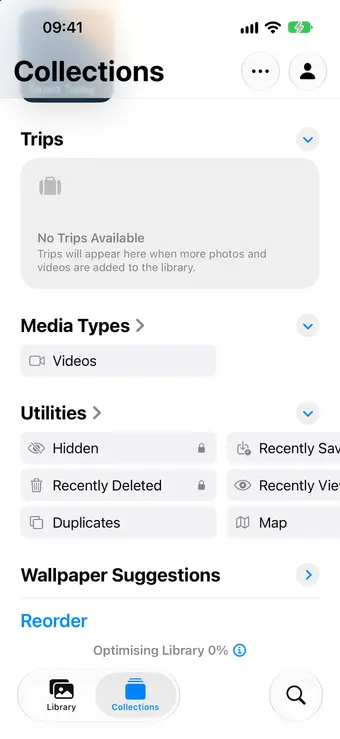
For more on keeping photos out of the main library, see our guide on how to hide photos on iPhone.
Where an encrypted vault fits
An encrypted vault solves the specific problems above. The photo lives inside an app that has its own lock, so your phone’s passcode doesn’t open it, and it’s encrypted before it’s backed up, so your cloud account alone doesn’t expose it.
Where Hideroom fits
Hideroom, coming to iPhone soon with Android next, has a place for papers like this. Any room can hold documents, with a camera scan that finds the edges of the page and straightens it, a type and title you choose, and export as a PDF when you need to send a copy to an embassy or airline. You can type in an expiry date by hand and the room will show a “Renew soon” chip as it approaches. Everything is encrypted on your phone with AES-256-GCM before it’s backed up to your own iCloud, and nobody can read it without your pattern and your phone, or your recovery phrase: not us, not Apple, not Google. The security page explains what that covers and what it doesn’t.
The same thinking applies to crypto recovery words, with one difference. A photo of recovery words is only as safe as the phone, so keep a paper or metal copy for larger amounts.
Questions
Does a photo of my passport help if I lose it abroad?
Yes. The US State Department lists a photocopy of your missing passport as one way to prove citizenship when you apply for a replacement at an embassy, and GOV.UK says a photocopy or photo helps you answer questions when you cancel a lost UK passport.
Can I travel with a photo of my passport instead of the real one?
No. A photo or scan is a record, not a travel document. Apple’s Digital ID, made from a US passport, also isn’t a replacement: Apple says it can’t be used for international travel or border crossing.
Is the iPhone Hidden album safe enough for a passport photo?
It’s better than leaving it in your main library, but it opens with your phone’s passcode, and with iCloud Photos on it syncs to iCloud like everything else. For something as useful to a fraudster as a passport, a place with its own lock and its own encryption is the safer choice.
Should I delete the passport photo from my camera roll after moving it?
Yes, once you’ve checked the copy opens properly where you moved it. Remember it then sits in Recently Deleted for 30 days, so delete it from there too if you want it gone from the phone and from iCloud Photos straight away.
Written by Zaniar with AI research help, and checked against the sources below on 23 October 2026.How we write guides
Related guides
Recovery words · 5 min read
Is it safe to take a photo of your seed phrase?
Wallet makers say never to photograph or screenshot a seed phrase. Here's why, the best way to store a seed phrase, and where a digital copy fits.
Hiding photos · 5 min read
How to hide photos on iPhone
Hide photos on iPhone with the Hidden album, lock it with Face ID, and learn what it doesn't protect against. Checked against Apple's guides for iOS 27.

Hiding photos · 5 min read
How to lock photos on iPhone
Lock photos on iPhone with Face ID, lock the whole Photos app, or password protect pictures in Notes. Every option for iOS 27, and what each one misses.


Sources
- International traveler's checklist, US Department of State, checked 23 October 2026
- Lost or stolen passport abroad, US Department of State, checked 23 October 2026
- Foreign travel checklist, GOV.UK, checked 23 October 2026
- Cancel a lost or stolen passport, GOV.UK, checked 23 October 2026
- Use your Digital ID in Apple Wallet, Apple Support, checked 23 October 2026
- Set up and use iCloud Photos, Apple Support, checked 23 October 2026
- iCloud data security overview, Apple Support, checked 23 October 2026
- Apple can no longer offer Advanced Data Protection in the United Kingdom to new users, Apple Support, checked 23 October 2026
- How to use iCloud Shared Photo Library on iPhone or iPad, Apple Support, checked 23 October 2026
- Hide photos on your iPhone, iPad, Mac or Apple Vision Pro with the Hidden album, Apple Support, checked 23 October 2026
- Delete photos on your iPhone or iPad, Apple Support, checked 23 October 2026
Spotted something out of date? Email support@hideroom.app.